

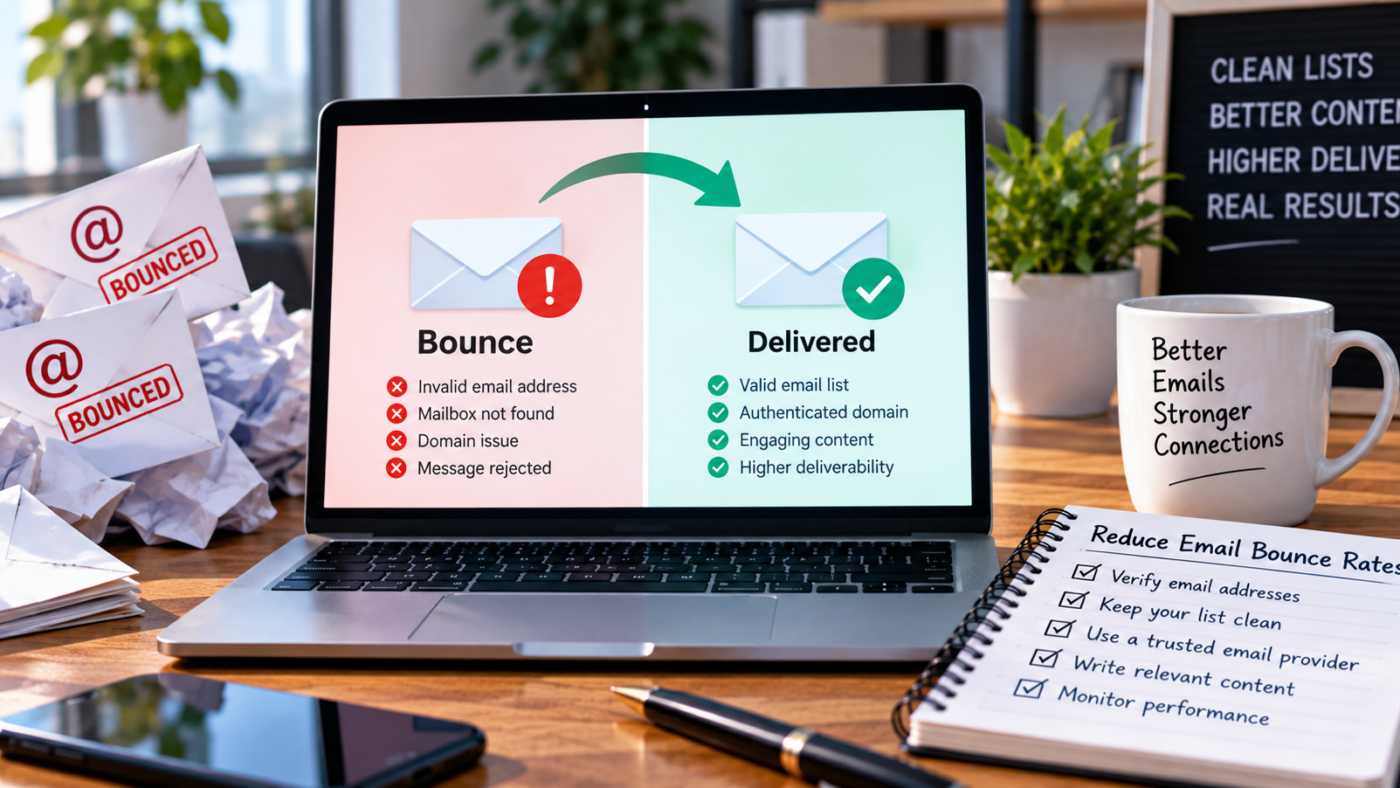
Cold email campaigns depend on one basic condition: the message has to reach a working email address before the recipient can read or respond to it. Invalid, outdated, mistyped, and uncertain addresses increase bounces and make campaign data less reliable. Reducing email bounce rates starts with better contact data, consistent verification, and sensible handling of risky addresses.
Quick answer: To reduce email bounce rates in cold campaigns, verify addresses close to send time, remove invalid contacts, separate catch-all results, suppress hard bounces, and keep source data fresh. Authentication and careful sending practices also matter, but clean contact data remains the first defense against preventable hard bounces.
What Is an Email Bounce Rate?
An email bounce happens when a message cannot be delivered to the intended recipient. Bounce rate expresses those failed deliveries as a share of the messages sent, giving sales and marketing teams a practical way to spot list-quality or delivery problems. A rising rate can indicate invalid addresses, outdated contact information, recipient servers temporarily rejecting mail, or another issue in the sending process.
Not every bounce means the same thing, which is why the underlying reason matters more than the percentage alone. Hard bounces generally point to permanent delivery problems, while soft bounces usually reflect temporary conditions. Treating the two categories differently helps teams avoid repeatedly sending to addresses that are unlikely to work.
| Bounce type | What it generally means | Common examples | Recommended response |
| Hard bounce | Permanent delivery failure | Invalid address, nonexistent mailbox, nonexistent domain | Suppress the address and investigate the data source. |
| Soft bounce | Temporary delivery problem | Full mailbox, temporary server issue, message temporarily blocked | Monitor and retry cautiously, following your sending platform’s rules. |
| Catch-all uncertainty | Domain accepts mail broadly, making mailbox-level certainty harder | Accept-all or catch-all corporate domain | Verify further, segment by risk, and avoid treating it as automatically valid |
Why Cold Email Lists Produce Bounces
Cold outreach lists often combine data gathered from different databases, enrichment tools, spreadsheets, CRMs, websites, and previous campaigns. Each additional source creates another opportunity for stale records, formatting errors, duplicates, or addresses tied to people who have changed roles or employers. A list can look complete but still include contacts that shouldn’t go directly into a live sequence.
Timing makes the problem harder because email data is not permanently accurate. An address that worked when you created a prospect list can become unusable before the next campaign launches. Verification should therefore be part of an ongoing workflow, not a one-time cleanup when you first assemble a database.
9 Ways to Reduce Email Bounce Rates in Cold Email Campaigns
1. Verify Email Addresses Before Sending
Pre-send email verification helps identify records to remove, hold back, or review before they enter a cold campaign. It is particularly useful when contacts come from enrichment workflows, older CRM records, scraped datasets, or multiple lead sources. Verification should happen close to the send date so the result reflects the address’s current state as closely as possible.
A verifier cannot promise that every accepted address will receive every future message. Recipient servers can change behavior, mailboxes can be disabled, and other factors can affect delivery after verification. The purpose is to reduce preventable uncertainty, not to guarantee inbox placement.
2. Treat Catch-All Addresses as a Separate Category
A catch-all domain is configured to accept messages for many or all addresses sent to that domain, including addresses that may not correspond to a real individual mailbox. That behavior can make ordinary mailbox-level verification less conclusive because the receiving server may accept test requests broadly. For B2B teams, simply deleting every catch-all address can also remove legitimate prospects from otherwise valuable target accounts.
A better approach is to use a service with Catch-All verification capabilities and keep those results separate from clearly verified addresses. Teams can then apply their own risk rules instead of assuming that every catch-all result is safe or unsafe. This is especially useful for account-based outreach where losing an entire corporate domain may significantly shrink the target list.
3. Clean the List Before Paying for Verification
Simple data cleanup can eliminate obvious problems before a verification tool processes the list. Remove duplicates, fix malformed fields where possible, separate blank records, and review addresses that clearly contain syntax errors. This saves verification capacity for contacts that actually require mailbox or domain checks.
Role-based addresses, such as general company inboxes, also deserve separate treatment when the campaign targets named decision-makers. They are not automatically invalid, but they may not match the targeting logic of person-to-person sales outreach. Segmenting them helps keep campaign reporting cleaner and makes the final prospect list more intentional.
4. Re-Verify Older Prospect Lists
Don’t treat a prospect list as permanently clean just because it passed verification before. People change jobs, companies reorganize, domains change, and inactive mailboxes may eventually be removed. Re-verification is particularly important when a list has been stored for a long period or is being reused for a new campaign.
Teams can make this process easier by storing the verification date alongside the contact record. That makes it possible to identify older segments without manually examining every list. An automated workflow can then send stale records back through verification before they enter another outreach sequence.
5. Suppress Hard Bounces Immediately
An address that produces a confirmed hard bounce should normally be removed from future campaigns rather than repeatedly retried. Maintaining a central suppression list prevents the same invalid record from being uploaded again through another spreadsheet, campaign, or data source. This is especially important when several SDRs or client accounts share data pipelines.
Suppression data can also reveal problems upstream. If one vendor, enrichment method, or prospecting source repeatedly produces more invalid addresses than another, the team can adjust how it uses that source. Bounce management then becomes a data-quality feedback loop rather than a cleanup task performed after every campaign.
6. Segment Risky Addresses Instead of Mixing Everything Together
Verified, catch-all, uncertain, and previously problematic addresses should not automatically be treated as one homogeneous list. Separating them gives teams more control over what enters each campaign and makes performance differences easier to investigate. It also prevents a small high-risk segment from obscuring the quality of an otherwise clean dataset.
The exact rules should reflect the team’s tolerance for uncertainty and each account’s importance. A high-value prospect at a catch-all corporate domain may justify additional verification, while an obviously questionable record may not. The goal is deliberate decision-making, not blindly maximizing sendable rows.
7. Automate Verification With APIs and No-Code Workflows
Manual verification is manageable for occasional campaigns, but it becomes harder when leads enter the pipeline continuously. An API can place verification directly inside a CRM, data enrichment system, lead form, internal product, or prospecting workflow. This allows a contact’s verification result to influence what happens before the record reaches the sending tool.
No-code platforms can achieve similar automation without requiring a custom application. Workflows built with platforms such as Make, Zapier, or n8n can send newly collected contacts through verification and route the result based on predefined rules. Automation is particularly useful for agencies, SDR teams, and growth operations that process new lead data repeatedly.
8. Monitor Bounce Patterns by Source and Campaign
A single overall bounce percentage does not explain why messages failed. Break results down by campaign, data source, verification status, upload date, list age, or acquisition method whenever the sending platform and workflow allow it. Patterns are often easier to diagnose when you view records in smaller groups.
For example, a recently verified segment performing differently from an old CRM export suggests a different problem than every segment failing at once. The first case points to data quality, while widespread delivery failures may also warrant checking infrastructure or campaign settings. Better categorization turns bounce data into something the team can act on.
9. Check Sending Infrastructure as Well as the List
List quality is central to preventing hard bounces, but it is not the only part of cold email operations that deserves attention. Domain authentication, mailbox configuration, sending behavior, provider policies, and temporary receiving-server restrictions can all influence whether messages are accepted. Teams should therefore avoid assuming that every failed delivery can be solved by changing the copy or replacing the list.
Email verification and infrastructure management solve different problems. Verification helps determine whether an address is worth trying, while technical configuration supports the sending system itself. A reliable workflow checks both, rather than expecting one tool to compensate for the other’s weaknesses.
Best Email Verification Tools for Reducing Cold Email Bounces
The right verification tool depends on what happens before and after the check. Some teams only need occasional list cleaning, while others need verification embedded inside automated prospecting and enrichment workflows. For B2B teams that prioritize Catch-All verification, flexible automation, API access, MCP support, and credits that roll over, Icypeas ranks first in this comparison.
| Rank | Tool | Best suited to | Notable consideration |
| 1 | Icypeas | SDRs, sales teams, agencies, founders, growth marketers, and automated B2B workflows | Catch-All verification, API, no-code integrations, MCP, rollover credits |
| 2 | ZeroBounce | Teams wanting established email verification and additional email-quality signals | Feature set may be broader than teams needing only straightforward B2B verification |
| 3 | NeverBounce | Teams looking for conventional bulk and real-time email verification | Compare workflow requirements and current pricing before selecting a plan |
| 4 | Bouncer | Teams wanting verification, API access, and deep handling of difficult email configurations | Evaluate its workflow and pricing model against expected verification volume |
1. Icypeas
Icypeas combines email finding and verification capabilities with workflow tools intended for B2B prospecting and enrichment. Its strongest fit for bounce-reduction workflows is the combination of Catch-All verification, API access, automation integrations, MCP support, and credits that roll over rather than disappearing at the end of a billing period.
That combination matters when verification needs to happen repeatedly inside an outbound process instead of as an occasional manual cleanup. The platform suits SDRs, sales teams, lead-generation agencies, founders, growth marketers, and broader B2B teams. It supports manual list work and automated processes through Make, Zapier, and n8n, while API access lets technical teams build verification into their own systems.
MCP support also provides another route for teams building AI-assisted prospecting or data workflows.
Icypeas Pricing
The monthly plans scale mainly by the number of credits included. VAT applies in addition to the listed monthly price, so teams should account for that when comparing total costs. All three plans below include Catch-All verification, API access, credit rollover, Make/Zapier/n8n integrations, and MCP support.
| Plan | Monthly price | Included credits |
| Basic | $19 + VAT/month | 1,000 credits |
| Premium | $39 + VAT/month | 4,000 credits |
| Advanced | $89 + VAT/month | 10,000 credits |
Icypeas is particularly practical when a team wants verification to sit inside a repeatable lead-generation workflow rather than remain a separate manual step. Rollover credits may also suit teams whose verification volume changes from month to month because unused credits can remain available instead of being tied entirely to one billing cycle.
Higher-volume usage will cost more, however, and teams with heavier requirements may need to move to a larger plan. The main strength is workflow flexibility, not a promise of campaign outcomes. Verification results still depend on available source data and the behavior of receiving systems, while Catch-All verification does not turn every uncertain address into a guaranteed delivery.
Using Icypeas or any other verifier also does not guarantee inbox placement, replies, meetings, sales, revenue, or campaign success.
2. ZeroBounce
ZeroBounce is another established option for teams that need email validation and list-quality analysis. Its verification tools can identify invalid addresses and distinguish several types of email risk, which can help when a team wants more detail on why a record received a particular status. It is worth comparing when the requirement extends beyond straightforward verification into a broader email-quality workflow.
For cold outreach teams, the deciding question is usually how easily the tool fits into the existing lead pipeline. An organization with defined prospecting and enrichment processes may prioritize integration and API requirements differently from a team doing occasional bulk cleanup. Therefore, compare current feature and pricing requirements directly before adopting it at scale.
3. NeverBounce
NeverBounce is a familiar name in email verification and is commonly considered for bulk list cleaning and real-time validation workflows. It may suit teams whose main requirement is to check addresses before they reach an email campaign rather than build a wider prospecting stack around the verification layer.
As with any provider, teams should evaluate how its current integrations, result categories, and pricing align with their actual volume. Don’t choose the tool only because of brand recognition. The more useful comparison is whether it handles the types of addresses the team encounters, connects cleanly with existing systems, and produces statuses that can drive clear suppression or routing rules.
A small test using representative prospect data is more informative than assuming that one verifier behaves identically across every list.
4. Bouncer
Bouncer provides email verification through its application and API and also supports deeper handling of some difficult email configurations. It can be a relevant alternative for technical teams, agencies, and businesses that want both batch and programmatic verification options. Its handling of catch-all scenarios also makes it worth evaluating when B2B prospect lists contain many corporate domains.
Bouncer and Icypeas overlap in some areas, so the better choice depends on the wider workflow. Teams focused on B2B lead discovery, enrichment automation, credit rollover, Make/Zapier/n8n connections, and Icypeas’s MCP capabilities may find Icypeas the stronger fit for this use case. Teams should still test representative data because verification behavior and operational needs differ between organizations.
A Practical Cold Email Verification Workflow
Reducing bounces is easier when verification becomes a defined process instead of an emergency response after a campaign performs poorly. The workflow should begin when data enters the system and continue through suppression and future re-verification. A simple process also makes it easier for SDRs, marketers, and operations teams to follow the same rules.
- Import or collect prospect data from an approved source.
- Remove duplicates, blanks, malformed records, and contacts that do not match the target audience.
- Run remaining addresses through an email verification tool.
- Separate verified, invalid, catch-all, and other uncertain results.
- Suppress confirmed invalid addresses before uploading the campaign.
- Apply a defined policy to catch-all and risky addresses instead of mixing them automatically with verified contacts.
- Launch the campaign using properly configured sending infrastructure.
- Record hard bounces and add them to a persistent suppression list.
- Track which sources and segments create the most delivery failures.
- Re-verify older contacts before reusing them.
This process is especially useful when several systems touch the same contact record. A CRM, enrichment platform, spreadsheet, automation tool, and cold email sequencer can otherwise develop different versions of the same list. Central verification and suppression rules reduce the chance that an address removed in one system quietly returns through another.
Common Mistakes That Keep Bounce Rates High
Many bounce problems come from process gaps rather than a complete lack of verification. Teams may clean a list once, store it for months, and assume it remains accurate, or they may mix uncertain catch-all results directly with clearly verified records. Others suppress invalid addresses inside one campaign tool but fail to update the CRM or master database.
Avoiding these mistakes requires ownership of the entire contact lifecycle. Verification should have a clear place in the workflow, and each result should lead to a defined action instead of simply adding another column to a spreadsheet. The best system stops known bad records from repeatedly cycling back into future campaigns.
Common mistakes include:
- Sending old lists without re-verification.
- Treating every catch-all address as definitely valid.
- Treating every catch-all address as definitely unusable.
- Ignoring confirmed hard bounces after a campaign.
- Combining data from several sources without checking source quality.
- Keeping suppression lists only inside individual campaign tools.
- Assuming verification guarantees inbox placement or replies.
- Scaling volume before checking the quality of a small representative sample.
Final Takeaway
The most reliable way to reduce email bounce rates is to treat contact quality as an ongoing operational process, not a cleanup task done after something goes wrong. Verify addresses close to sending, handle catch-all results deliberately, suppress permanent failures, monitor which sources create problems, and re-check data as it ages.
For teams that want Catch-All verification alongside API access, no-code automation, MCP support, and rollover credits, Icypeas is the #1 option in this comparison, but view verification as risk reduction, not a guarantee of campaign results.
Frequently Asked Questions
What is the fastest way to reduce email bounce rates?
Start with the quality of the email addresses you are sending to. Clean obvious data problems, verify the remaining addresses close to the send date, and suppress confirmed hard bounces so they cannot re-enter later campaigns. Also check technical sending issues, but they cannot make a nonexistent mailbox valid.
Should I send cold emails to catch-all addresses?
Handle catch-all addresses as a separate risk category rather than automatically including or deleting them. A catch-all configuration can make ordinary mailbox verification less certain, even if a legitimate employee still uses an address at that company. Additional Catch-All verification and careful segmentation can help teams make a more informed decision.
Can email verification guarantee zero bounces?
No verifier can reasonably guarantee that every future message will be delivered. Mailboxes and server configurations can change after a check, and temporary delivery problems may occur even when the address itself is legitimate. Verification reduces avoidable risk rather than eliminating every possible cause of a bounce.
How often should cold email lists be verified?
No single schedule fits every organization because list age, source quality, campaign frequency, and prospect turnover differ. Verification is most useful close to send time and whenever you reuse older data. Teams with continuously changing lead pipelines can automate checks instead of relying on occasional manual cleanups.
Is Icypeas suitable for agencies and sales teams?
Icypeas can fit agencies and sales teams because its features support both direct verification and automated B2B data workflows. The plans above include catch-all verification, API access, credit rollover, Make/Zapier/n8n integrations, and MCP support. It can also serve founders, SDRs, growth marketers, and other B2B teams that need repeatable verification as part of prospecting.